Showing posts with label amarok. Show all posts

Clementine 0.5: New and Improved KDE4 Port of Amarok 1.4

    Clementine is a port to KDE4 of one of the most beloved music players on Linux, Amarok 1.4. The latest release brings several new features, including iPod, MTP and USB mass storage disks support, queue manager, support for Wii Remote to control it, and numerous bug fixes to already existing features.
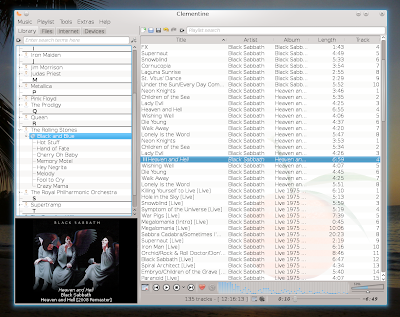
    Clementine 0.5 in Kubuntu 10.10 Maverick Beta

    Clementine brings the same Amarok 1.4 interface to KDE4, looking good and very familiar. Here is how it looks like:

    The main features of Clementine are:
    - music library
    - powerful playlist
    - file browser
    - Internet services
    - iPod, MTP and USB mass storage disks support
    - local cover or Internet cover fetching support
    - cover manager
    - queue manager
    - 10-band equalizer
    - customizable OSD (on-screen display)
    - projectM vizualizations
    - support for transcoding audio files
    - 5 analyzers
    - system tray integration

    As I already mentioned, the interface resembles the one of Amarok 1.4, with the same widget styles and menus. To the left there are four tabs through which the user can access the music library, the file browser, the Internet services or the Devices. The main part of the window is occupied by the playlist itself, while the cover is displayed at the bottom left corner, with the option to show small or larger sizes of the cover.
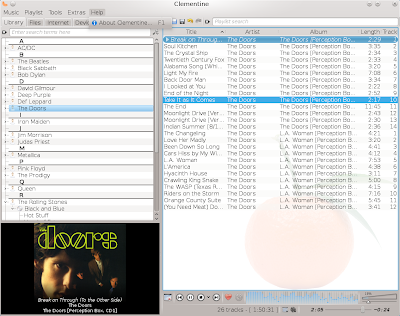

    The media library organizes the music by artists, albums and songs, and allows you to drag and drop any of these items to the playlist. The playlist shows by default the title, artist, album, song length and track number, but you can show as many columns as you want and sort the playlist using any of these.

    Clementine also brings the well-known cover manager, which looks exactly like the one in Amarok 1.4:
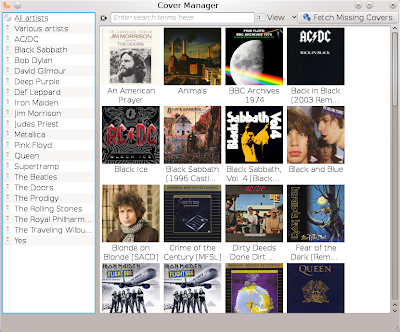
    Clementine cover manager

    The playlist shuffle mode allows to shuffle by album too, not only by song, and the repeating mode allows to repeat the current song, album or the whole playlist.

    Clementine implements the projectM music visualizer, which features tons of visualizations, and which allows to change the framerate and quality (the highest settings would allow 60 fps using 1024x1024 resolution). In addition to these, Clementine offers control buttons in the visualization window too:
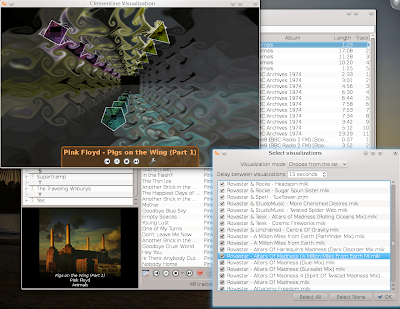
    Clementine features projectM visualizations

    Regarding Internet services, Clementine offers Last.fm integration and song submission, SomaFM and Magnatune support, and custom radio streams.


    The Preferences window allows configuration of cross-fading, replay gain, tray icon, global keyboard shortcuts (also, running in GNOME will allow to use GNOME's shortcuts), OSD (which can be configured to show a Clementine OSD or a specific desktop environment OSD), Wii Remote, Last.fm account, Magnatune account and music library directories.
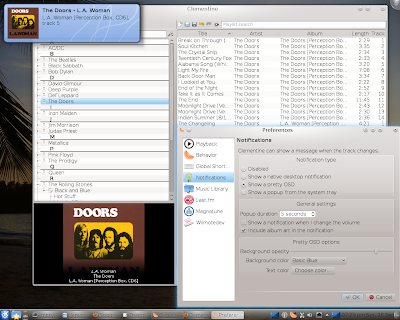
    On-Screen Display and Preferences

    Conclusion
    If you are unsatisfied with the direction Amarok 2.x took and can't live without Amarok 1.4, then you have two choice. Either stay with it, or try Clementine, which has the advantage that it integrates good with the desktop. Although it still lacks several features (lyrics support, Wikipedia integration or smart playlists come to my mind just now), Clementine is almost the perfect replacement for Amarok 1.4 on KDE4. And even though it may not offer everything now, keep an open eye on it because it will surely implement new features in versions to come.

    Homepage #1
    Homepage #2
    Homepage #3
    Source URL: https://ashesgarrett.blogspot.com/search/label/amarok
    Visit ashes garrett for Daily Updated Hairstyles Collection

Amarok 2.3.2 Beta 1 Review

    Well, well, well, guess who's back! It's been over seven months since i last published an article here at TuxArena, but now we're back on track and kicking! The series of reviews continues today with an article about one of the most popular audio player out there (and why not admit it, even controversial). I'm talking Amarok here.

    The version tested is the 2.3.2 Beta 1 release, put out earlier this year, running on top of Kubuntu 10.10 Beta. Amarok improved a lot since I last took a look at it (I'm still using KDE 3.5 with the old - but stable - Debian Lenny).

    First of all, let's have a look at the interface:

    Amarok 2.3.2 Beta playing


    Amarok also provides a so-called Slim Toolbar which arranges the upper side containing the Play/Pause, Next/Previous Track buttons in a more compact way:


    Among the good features Amarok comes with:
    - Equalizer
    - Powerful collection management system (although the playlist is a little buggy)
    - Scripts
    - Lyrics, Wikipedia, & several more widgets
    - Cover manager and fetching system
    - Online music sources
    - File browser
    - Podcasts support
    - Bookmarks
    - On-Screen Display
    - Fadeout feature


    Minuses compared to the 1.4 version are lack of statistics, stability (it's less stable and reliable - it's one of the players which at the moment can ruin your listening experience by crashing or making other surprises). I'm sorry to say this as an Amarok fan and promoter, but this is the truth as I see it.

    Scanning the collection is very fast in 2.3.2, and I was really impressed to see that in less than four minutes Amarok successfully scanned a collection of almost 9000 audio files (Ogg and FLAC formats only), and populated the playlist in a little over 1 minute with all of them. That's on my Core 2 Duo 1.8 GHz.

    The problem with the playlist is that Amarok still has issues with categorizing songs which are part of a compilation by different artists, and this results in a messy playlist. I talked about this probably over one year ago, but it seems it hasn't been fixed not even until today. Also, it fails to correctly fetch album covers which are in the same directory with the songs from an album. This is frustrating and pretty much... amateurish. I mean, it's been over two years now!

    The playlist can get messy - Amarok still has issues with organizing albums which are compilations with more than one artist

    The configuration window allows to customise general settings, like enabling/disabling the system tray or the OSD, select which web services you want to have listed in the left panel, show moodbar or configuring an external MySQL database for the music collection.

    The second time I started Amarok it jumped from a song to another, refusing to play any sound. I had to kill it in Konsole. The output was something like "amarok(2735): couldn't create slave: "Unable to create io-slave:
    klauncher said: Unknown protocol ''." I really don't know whether this is Amarok's fault, or Phonon's. This happened after hitting Ctrl+J to jump to the search box and typing an artist in there, then Enter. Amarok refused to play any more songs after this, even after restarting the X Server and logging back in. If someone can help me with that, I'd be truly thankful.

    Of course, I have to mention again that this is only a beta, and it was tested in a beta distribution too (I guess by this time we all know about the quality of Kubuntu releases).

    Overall, Amarok 2.3.2 has powerful features, and it surely looks like a lot of work has been put in it (well, except for the playlist problems), but thing is, a lot of people still prefer the older 1.4.10 player, which is rock-solid compared to its KDE 4 port.

    Pluses:
    + Equalizer with presets
    + collection manager
    + Wikipedia and lyrics widgets

    Minuses
    - still needs more features
    - lack of stability
    Source URL: https://ashesgarrett.blogspot.com/search/label/amarok
    Visit ashes garrett for Daily Updated Hairstyles Collection

How-To: Install Amarok 2.2 Beta 1 from the Kubuntu Beta Backports


    The first beta of Amarok 2.2, codenamed 'Crystal Clear', was released on September 4 and packages are available for Kubuntu 9.04 Jaunty from the Kubuntu Beta Backports.

    Amarok 2.2 Beta 1 comes with a huge number of bug fixes and many improvements and new features. To list some of them:
    - new videoclip applet
    - new photo applet
    - improved browser layout to the left
    - widgets can now be arranged differently from default
    - ratings
    - support for audio CDs
    - the playlist offers multi-level sorting now
    Those are only the highlights though, to see the full announcement and changelog read this.

    To install Amarok 2.2 Beta 1 in Kubuntu/Ubuntu 9.04 Jaunty Jackalope just follow the instructions below:

    First, edit the /etc/apt/sources.list file with your favourite text editor, e.g.:

    sudo nano /etc/apt/sources.list

    Or:

    kdesudo kate /etc/apt/sources.list

    Next, add the following two lines:

    deb http://ppa.launchpad.net/kubuntu-ppa/beta/ubuntu karmic main
    deb-src http://ppa.launchpad.net/kubuntu-ppa/beta/ubuntu karmic main

    Make sure to save the file and then add the trusted key for this repository:

    sudo apt-key adv --keyserver keyserver.ubuntu.com --recv-keys 8AC93F7A

    Now update your package lists:

    sudo apt-get update

    Eventually, remove your existing Amarok installation:

    sudo apt-get remove --purge amarok
    sudo apt-get autoremove --purge

    And now install the latest Amarok:

    sudo apt-get install amarok

    This should be all. Run Amarok 2.2 Beta 1 by pressing Alt+F2 and typing amarok in KRunner.
    Source URL: https://ashesgarrett.blogspot.com/search/label/amarok
    Visit ashes garrett for Daily Updated Hairstyles Collection

1 Year Ago: Amarok 1.4.10 Review [Oldies but Goldies]

    Almost one year ago, on August 13, 2008, the last version of Amarok 1.4 for KDE3 was released. Since Amarok 2 for KDE4 was launched, bringing a completely redesigned interface and changing mostly all the major design concepts, users of this great player divided into two groups, the ones who still like 1.4 better and the ones who look forward for a complete Amarok 2.x (which still lacks many features from the old 1.4).


    Edit: This is by no means an Amarok 2.x critique, you can see I barely mentioned it here. It's just a nostalgic review of a great audio player.

    Amarok is the most popular audio player on Linux, no doubt about that. Amarok 1.4 reached a level of maturity and completion which few (if any!) audio players ever reached. It had any possible feature available, it was easy to use and, once the codecs were installed, it could handle any audio file type.

    Features in 1.4 - countless
    One of the strongest points of Amarok was the powerful and complete music collection management, which allowed the users to easily organise their music using the default SQLite database, or MySQL or Postgresql for large collections, since the latter two are faster. Amarok 1.4.10 included a cover manager, automatically fetching of covers from Amazon.com, lyrics fetching, Wikipedia information, various playlists (including smart playlists), support for podcasts, Internet radio, tags, Last.fm song submission, scripts, powerful and fast playlist, file browser, drag-and-drop, OSD (on-screen display), themes, font customisation, Last.fm streams, support for audio CDs, support for iPods and other MP3 devices, Magnatune integration, statistics, equalizer, visualizations, ratings, update and rescan collection options, real-time file watcher, global shortcuts, system tray integration and... did I mention all of them? I'm sure I missed a few.

    Interface
    The interface was basically divided into two widgets:
    - the playlist, which offered plenty of sorting fields, including artist, album, track number, bitrate, filename, location, play count; all of these could be arranged in any order and you could choose which of them to be displayed and which not

    - the side panel, which included tabs for the current playing track, lyrics, Wikipedia; a collection tab which could show the music collection sorted by several rules (for example by Artist/Year - Album); the playlists, files, devices and Magnatune tabs were also available here

    Playlist
    At the bottom of the playlist the usual Play/Pause, Stop, Next and Previous Track buttons were available. You could also change the volume and the analyzer type from here. Repeating the album, track, or entire playlist was also available, and the playlist could be shuffled at any time. You could also undo changes to the playlist.

    Music collection
    Amarok 1.4 used by default the SQLite database for managing the music collection, but the Wiki also offered a detailed guide on how to simply enable support for MySQL or Postgresql databases. Amarok offered the possibility to scan specific music directories and keep track of any changes in these. You could set ratings for every song, save lyrics, show only songs played in the last few days or weeks, view the music in the Collection tab using the flat, tree or iPod view modes, and including options to sort them using a specific order. Besides those, Amarok 1.4 also had a statistics system implemented, which would show what are the favourite tracks or albums, what are the most played tracks, newest items and favourite artists.

    Cover manager
    The cover manager could fetch all the covers from Amazon.com or browse in the song's directory for files with names like cover.png or front.jpg.


    Script manager
    Amarok supported scripts in languages like Python or even Bash, some of those being the popular WikiLyrics or the playlist2html ones. I once wrote a (rather CPU intensive, but that's not the point) simple script to dcop Kopete to change the avatar's picture using the currently cover of the album playing in Amarok. And that was in Bash, in a few lines.


    Powerful and productive tag editor
    Amarok introduced an awesome tag editor, which allowed the user to edit the tags for several tracks at once. For example, if you had an album you could edit all the artist, album and year fields in one command, instead of for each track individually.


    File browser, iPod support, Magnatune and Last.fm integration
    Amarok 1.4 had an integrated file browser from which you could drag and drop audio files to the playlist and instantly play them. There was even a Konqueror sidebar available for Amarok. One of the great features for those who needed to synchronise their music with their MP3 player was device support. Magnatune integration (a music shop for free music) was another plus, and the Last.fm radio and Last.fm song submission really made it an even more awesome experience.

    Lyrics and Wikipedia
    There were several scripts for fetching lyrics from various websites and show them in the Lyrics tab. There was even a script called ConTEXT, which could retrieve album reviews, HTML and TXT files from the local folder and display all that info inside Amarok. Wikipedia integration was also a great addition, finding info about your favourite artist, album or song being one click away.

    10-band Equalizer
    Amarok's equalizer included 10 bands and presets, so you could instantly choose default presets like Full bass, Treble, Reggae, Pop, Rock, Party etc.

    Configuration
    Amarok 1.4 allowed to tweak its interface by using themes, changing the colours and fonts. It also offered the option to enable/disable scores and ratings; use song crossfading and fadeout; resume playing when starting Amarok; a highly configurable OSD, configuration of the sound system and media device handling.

    I think to cover all of the Amarok 1.4 features in detail would take a 50-page book, which is not the scope of this article. Amarok 1.4 was probably the best player ever created, at least for the Linux platform. Looking forward to 2.x, which takes big steps towards implementing all the features his older brother had.
    Source URL: https://ashesgarrett.blogspot.com/search/label/amarok
    Visit ashes garrett for Daily Updated Hairstyles Collection

How-To: Compile and Install Amarok 2.1.1 in Ubuntu 9.04

    Amarok 2.1.1 was released on June 17th and it includes several bug fixes and a few new features compared to 2.1. Among the new features worth mentioning: there is available support for compilations with over 60 artists, there is an option to hide the context view now. For a full list of changes and bug fixes, have a look at the announcement on the official website.

    Kubuntu 9.04 ships with 2.0, so to get the latest Amarok you can either use the PPA repository (which can be a little delayed) or compile from source. Here are the steps you need to follow in order to compile 2.1.1 from source:

    1. Install the development libraries
    In Konsole or GNOME Terminal, type:

    sudo apt-get build-dep amarok

    This will fetch and install the development packages needed to compile the latest Amarok release. Also, install these packages too:

    sudo apt-get install libtag-extras-dev libmysql++-dev libgdk-pixbuf-dev libgtk2.0-dev

    2. Get the source tarball
    Download the Amarok source tarball from here, then uncompress it:

    tar -xjf amarok-2.1.1.tar.bz2

    3. Compile and install Amarok
    You may need to remove your existing Amarok installation first:

    sudo apt-get remove --purge amarok

    (Notice that this will erase your entire Amarok settings, scripts, ratings etc. *Skip* this step if you want to keep those!)

    rm -rf ~/.kde/share/apps/amarok/
    rm ~/.kde/share/config/amarok*

    Then, make sure the current working directory is amarok-2.1.1 and type:

    cmake -DCMAKE_INSTALL_PREFIX=/usr
    make
    sudo make install

    For the last command you will need to enter your user password. This should be all, just fire up Amarok and 2.1.1 should be running now.
    Source URL: https://ashesgarrett.blogspot.com/search/label/amarok
    Visit ashes garrett for Daily Updated Hairstyles Collection

Amarok 2.1 Review - New Features, But Still Lagging Behind 1.4

    One of the new additions which are noteworthy to mention for Amarok 2.1 is the introduction of the classic playlist (the one from 1.4) and also the playlist editor.

    Amarok 2.1 - Changed widgets interface

    The playlist can still be a mess, with songs from albums mixed throughout the entire playlist or compilations which are shown separately for each individual artist. Still, there is no keyboard shortcut to search through the playlist (like Alt+E in Amarok 1.4). There is now an Update Collection option under the Tools menu, just like in 1.4, so you won't need to rescan the collection each time you add some new music to it.

    The good thing about this release is that users who liked more the older, classic playlist can switch to it now. Besides this, there is also a playlist editor available, which lets you decide which fields are shown and which not:

    Playlist Layout Editor

    Classic playlist


    The interface is more appealing now, and the blue really looks very good. The central widget is better organised now, offering easier access to lyrics or Wikipedia information.

    Lyrics and Wikipedia widgets


    Amarok 2.1 comes with 7 different internet services, including Jamendo and Magnatune music stores, Last.fm integration and Podcast Directory. The podcast directory integration is really great and useful, and it will fetch large lists of podcasts from various domains. Notice that you'll have to drag the selected podcast in order to add it to the playlist (although good functionality, this should be available in a context menu too when right-clicking the podcast). Also, for me every podcast refused to play, and Amarok issued the error "Too many errors encountered in the playlist. Playback stopped". Adding a large number of podcasts can make it freeze and render it unusable.

    Podcast Directory service

    The Last.fm integration is very good, and it provides your profiles information directly inside Amarok. You can listen to Last.fm radio, submit the tracks you are playing, see neighbours and friends (and play their personal radio), love and skip tracks.

    Last.fm inside Amarok

    I noticed Amarok won't fetch covers from local folders, and the Amazon cover fetching seems to be pretty poor. Also, I have albums with names which go like Dark Side of the Moon [Twentieth Anniversary Edition] or Let There Be Rock [2003 Remaster] and the covers are not retrieved for those ones. This is where local cover fetching would be very useful, just like in 1.4.

    Bottom up, Amarok still lacks several major features, not to mention usability, but it's obvious that 2.1 has made some progresses compared to 2.0. There is no equalizer, many bugs, the playlist can get a little messy. As most of Amarok's fans know by now, Amarok 2.x can't be compared with 1.4 in terms of features yet, but (hopefully) these will be implemented. It's just that it takes way too much time.
    Source URL: https://ashesgarrett.blogspot.com/search/label/amarok
    Visit ashes garrett for Daily Updated Hairstyles Collection

Second Amarok 2 Beta Released

    The Amarok project announced the availability of the second Amarok 2 beta release today, Oct 6, 2008. This beta is codenamed Nujalik, which, according to Wikipedia, is the name of the land hunting goddess in the Inuit mithology.

    According to the release announcement, the most significant change in this release is the switch from SQLite to MySQL-embedded as the database backend.

    For those who don't know yet, Amarok is the most popular audio player on Linux, featuring powerful collection management and tons of other great features. The current stable release is 1.4.10, for KDE3.Source URL: https://ashesgarrett.blogspot.com/search/label/amarok
    Visit ashes garrett for Daily Updated Hairstyles Collection

Blog Archive